

Account and Billing
Payments
Payments are due in full by 9am.
Payments can be made on the RideShare Carz app. Payments made via phone or text are subject to a $5 convenience fee.
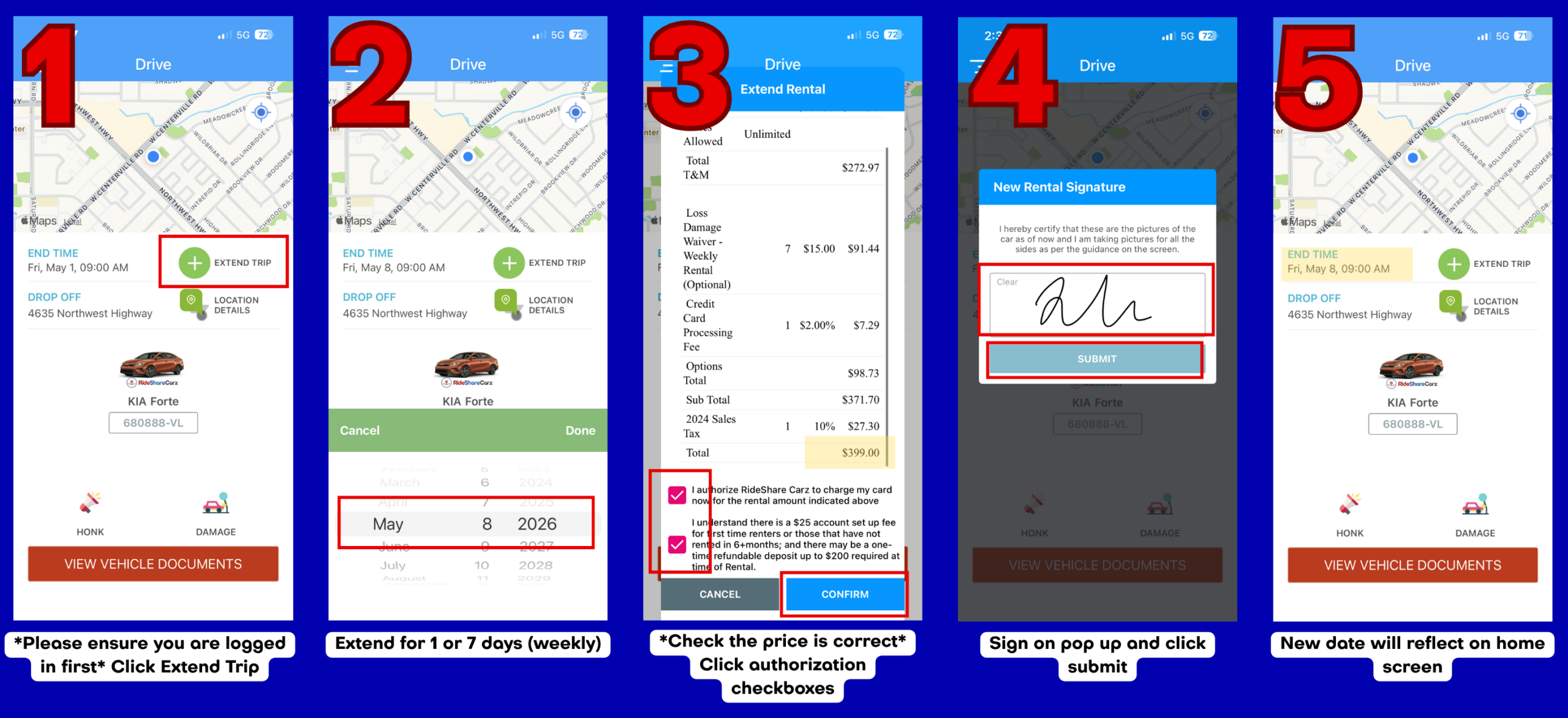
Select your RideShare Carz app icon below to view a step-by-step guide for completing your rental extension:

All payments must be made using a card that is in your name.
Rental Extension
All extension are due by 9am on your renewal day.
Extension can be made in daily or weekly increments after the initial rental agreement.
If your rental is not extended by the required time you will receive a $12 late fee on your account.
Weekly extensions must be completed before the rental end time. If you are unable to pay for the upcoming full week extension at time of rental, you will be required to pay the daily rental rate until a weekly extension can be paid in full.
Your rental can be extended up to 28 days. To renew your rental past day 28, you must sign a new rental agreement in person at one of our locations.
Toll Payments
Tolls are paid through our third-party provider, Toll-Aid. To access your Toll-Aid invoices, go to https://mytollreceipt.com/fleet/.
Your login information is your First & Last Name, and the email that is on your RideShare Carz rental account. **Please note that your login is Case Sensitive**
Tolls are billed WEEKLY on Tuesday, the invoice will be posted to your account by 5am. Invoices not paid by Thursday at 11:59pm will incur a $25 late fee.
Avoiding Vehicle Interruption
A payment in full is due no later than 11:59PM on Thursday to avoid vehicle interruption on Friday morning.
Drivers License Verification
It is essential for all drivers to maintain an up-to-date driver’s license on file with RideShare Carz. If your driver’s license is nearing its expiration date, you must text a picture of your new, valid license to us before the expiration date.
Failure to provide a current driver’s license by the expiration date will result in your rental vehicle being disabled. You will be unable to reactivate the vehicle until a valid, up-to-date license is submitted.
Interruptions
Oil Change
Oil changes and other maintenance are included in the price of your rental. For renters in the Dallas market, please call or text us at 972-781-2277 to schedule an appointment time to get this service performed. For all other Texas renters, we have partnered with Take5 to perform this maintenance service. Please call or text us, and we can provide you our fleet code for payment.
Tire Problems
According to your rental agreement, RideShare Carz covers the cost of normal vehicle wear and tear, including tires. If you’ve experienced a tire issue that falls under this category, we’ve partnered with Discount Tire to help you get back on the road quickly. Please call or text us at 972-781-2277 so we can arrange a tow (if needed) to the nearest Discount Tire location or provide assistance from our team.
If the tire damage is due to driver error, negligence, or an accident, the driver is responsible for the full towing and tire replacement cost. If available to the driver, they may choose to use personal roadside assistance options to cover such repairs.
Vehicle Inspection
Roadside Assistance
For roadside assistance, if you are an Uber driver enrolled in the Uber Pro program, please use that portal for faster service. Additionally, some vehicle models have a Make-specific roadside assistance number that may be utilized in the upper left corner of the windshield.
If these options do not apply to you, please text our office at 972-781-2277 for further instructions. We are committed to getting you back on the road as quickly as possible!
Disabled Vehicle
If your car is not turning on, it might be disabled. You could be experiencing this due to one of several reasons: you are outside our rental coverage area or you have outstanding amount due on your rental contract or TollAid account. Please clear the issue and contact our office, and we will reactivate your vehicle. A $5 reactivation fee will be charged.
If none of these reasons apply to you, please contact our office for roadside assistance.
Incident or Accident
In the event of an incident or accident, please follow these steps:
- Move to a Safe Location: If possible, move your vehicle to a safe place away from traffic to avoid further accidents or injuries.
- Contact the Police: If another vehicle or person is involved, call the police immediately. It’s essential to file a report to document the incident officially. If a police report was filed, please make a note of the report number. This will be required during the insurance claims process.
- Collect Insurance and Vehicle Information: Gather insurance details and vehicle information from all parties involved in the incident. This includes the insurance company name, policy number, driver’s name, and contact information. Also, note the make, model, and license plate number of each vehicle.
- Take Photos: Take clear photos of all vehicles involved in the incident from multiple angles. Ensure you capture any visible damage, the positions of the vehicles, and any relevant surroundings or landmarks.
- Inform RideShare Carz: Once the incident or accident scene has been cleared and it is safe to do so, you must contact our office to report the event. You can reach us at 972-781-2277.
All accidents must be reported to our office within 24 hours to remain eligible for a replacement vehicle once liability has been determined. Failure to report an accident within this timeframe may result in additional fees and may affect eligibility for a replacement vehicle.
You are also required to complete our Incident Report Form as soon as possible after the accident:
https://form.jotform.com/241630794424053- If the vehicle is drivable, please bring the vehicle to your location RideShare Carz location.
- If the vehicle is not drivable, contact us and we will arrange a tow.
- Report to Rideshare/Delivery Apps: If you were working for any rideshare or delivery apps, you will need to report the accident to that company and provide RideShare Carz with the claim number.
By following these steps, we can ensure a smooth and efficient handling of the incident or accident. Vehicle replacement is on a case-by-case basis.
Collections
Account Balance
Your vehicle rental is a prepaid rental agreement for the lifetime of your vehicle use. Any balance owed to RideShare Carz or a third party provider (such as TollAid) will put your vehicle at risk of disablement. Please ensure payment prior to 9:00 AM on your extension date to avoid any vehicle disruption. For accounts who are not paid in full by 9:00AM on the renewal date, a $12 late fee will be applied each day until the balance is cleared. Non- or consistent late-payment will lead to vehicle repossession.
Customer Vehicle Abandonment
A Vehicle Recovery/Repossession Fee of $350 will be added for vehicles that are not returned to a RideShare Carz location and for vehicles that are repossessed due to non-payment or past-due balances. A Vehicle Impound Charge will added if the vehicles is impounded. The renter is responsible for all costs associated with returning the vehicle to a RideShare Carz location.
If your vehicle is repossessed for non-payment, belongings in the vehicle may be picked up within 7 business days from the closest RideShare Carz location from the pickup spot.
Education
Insurance vs Damage Waiver
Learn more about the difference between insurance and the Loss Damage Waiver and what your coverage option are here!
Read your Rental Contract, Terms of Use, and Key Summary Terms
Please take a moment to review your rental contract, terms of use here, and key summary points below. It is the driver’s responsibility to read the entire contract. By renting a vehicle with RideShare Carz, you are agreeing to all the terms and conditions outlined in the Commercial Vehicle Short-Term Lease Agreement and Key Summary Points Agreement.
Texas
Arizona
Commercial Vehicle Short-Term Rental Agreement
Georgia